
How Does a Room Visualizer Work? (And When to Use One)
Introduction
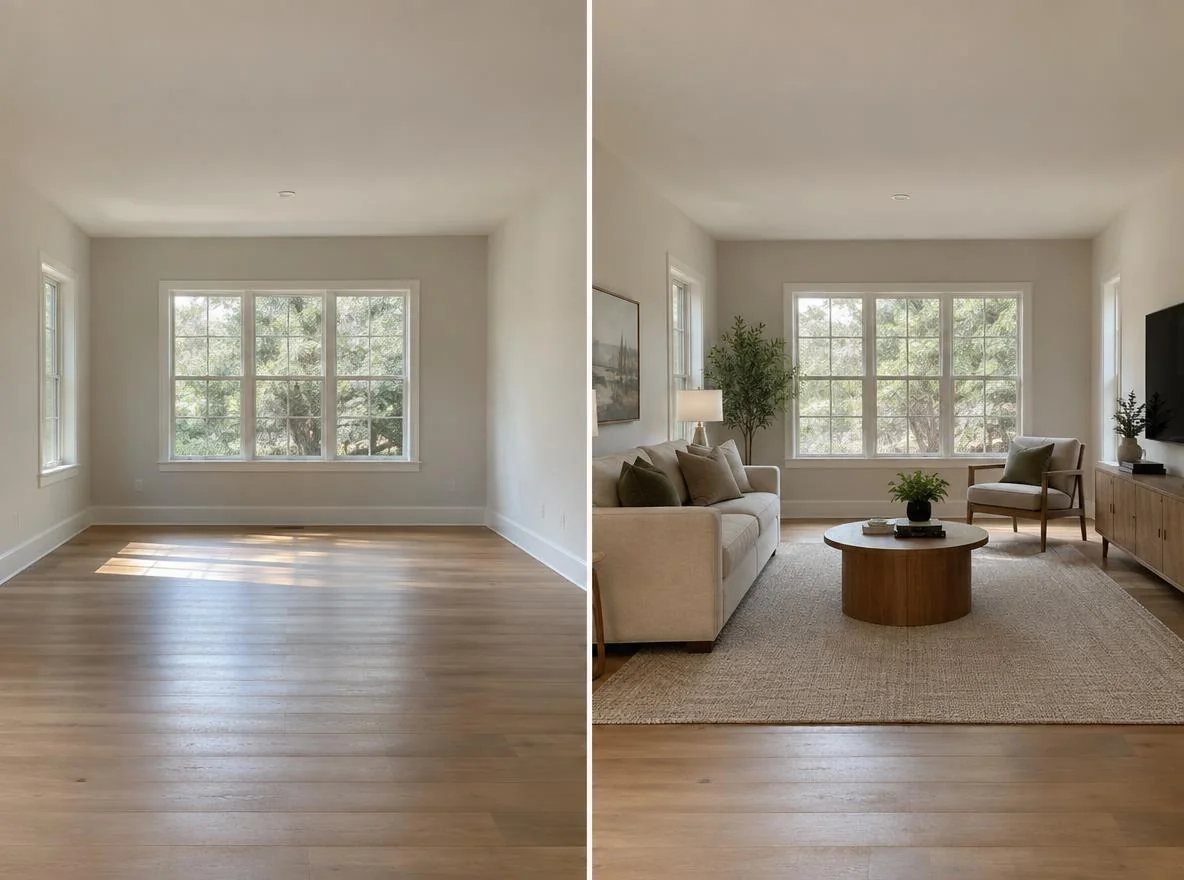
A room visualizer is a tool that shows you what a space will look like once it is furnished, so you can make decisions before you spend money or move anything heavy. The most common type today is photo-based: you upload one picture of your empty room, and AI fills it with realistic furniture and decor in about 30 seconds. Older approaches use 3D modeling or augmented reality (AR) instead.
If you are researching a room visualization tool before committing to one, here is the short answer. Photo-based AI is the fastest way to preview a whole furnished room. 3D modeling gives you the most control over exact measurements. AR is best for checking a single product in a space you already live in. This guide breaks down how each one works under the hood, what it does well, and when to reach for it.
We will keep this practical. By the end you will know which type of room visualizer fits your situation, whether that is a new home, a first apartment, or an empty unit you are planning to furnish.
Key Takeaways
- A room visualizer previews furniture and decor in a real space so you can decide before buying.
- Photo-based AI tools work from one photo of an empty room and return a furnished preview in seconds.
- 3D modeling offers precise measurements but takes longer and has a real learning curve.
- AR overlays single products live through your phone camera, and works best for a room you already occupy.
- Choose photo-based for speed and whole-room previews, 3D for exact layouts, and AR for spot-checking one item.
What Is a Room Visualizer?
A room visualizer is any tool that lets you preview furniture, layout, or decor in a space before it physically exists that way. The goal is always the same: reduce guesswork so you avoid buying a sofa that swallows the room or an ottoman that blocks the walkway. Where visualizers differ is in the technology they use to build that preview.
There are three main approaches, and understanding the difference is the whole point of choosing the right tool.
Photo-based AI takes a real photograph of your room and uses image generation to add realistic furniture directly into the scene. You do not build anything. You upload, pick a style, and the tool returns a furnished version of your actual room. This is the same idea behind modern virtual staging for homeowners, applied to everyday planning.
3D modeling asks you to recreate your room digitally by entering dimensions and dragging in furniture models. It produces a scale-accurate floor plan you can rotate and measure. Think of the classic room planner apps from furniture retailers.
Augmented reality (AR) uses your phone camera to place a single 3D product model into your live camera feed, so you can walk around it. It is the technology behind IKEA Place and similar apps.
| Type | How it works | Speed | Best for |
|---|---|---|---|
| Photo-based AI | AI furnishes a photo of your empty room | Seconds | Whole-room previews, style comparisons |
| 3D modeling | You rebuild the room to scale and add models | Hours | Exact measurements and layouts |
| AR | Live camera overlays one product model | Minutes | Checking a single item in place |
Why a Room Visualizer Matters
Furnishing an empty space is one of the more expensive guessing games most people play. A sofa, rug, and coffee table can easily run into four figures, and returning oversized furniture is a hassle that often involves restocking fees and reshipping. Seeing the room furnished first turns a risky purchase into a confident one.
A room visualizer helps in three concrete ways. First, scale. A layout that looks fine on a product page can crowd a real room, and a preview shows you the proportions in context. Second, style. It is far easier to judge whether a warm oak-and-beige look suits your space when you can see it in your own walls and windows rather than in a showroom. Third, commitment. Previewing before you buy means fewer regret purchases and fewer returns.
This matters most in specific moments: you just moved into a new home, you are setting up a first apartment, or you are planning a furniture purchase for an unfurnished rental. In each case you are staring at an empty room and trying to imagine the finished result. A visualizer does that imagining for you, with a realistic picture instead of a mental sketch.
How to Get Started With a Room Visualizer

Getting started depends on which type you pick, but photo-based AI is the quickest path from empty room to finished preview. Here is how the whole process typically works, step by step.
1. Take one clear photo of your empty room. Stand in a doorway or corner so you capture as much of the space as possible. Shoot in daylight if you can, keep the camera level, and avoid heavy shadows. A clean, uncluttered empty room gives the AI the most room to work with.
2. Upload the photo to the tool. Most photo-based tools accept a standard phone photo. No measurements, no floor plan, no account setup marathon.
3. Choose a style or room type. You select a look, such as modern, cozy, or minimalist, and often the room function (living room, bedroom, home office). This tells the AI what kind of furniture to add.
4. Generate and review. In roughly 30 seconds you get a furnished version of your actual room. You can regenerate for different arrangements or styles and compare them side by side.
If you want to test this workflow on your own space, you can use a room visualizer to preview furniture in your empty room from a single photo, then swap styles until one clicks. For a full walkthrough of a no-cost version of this process, our step-by-step free virtual staging guide covers the details.
One honest caveat about photo-based AI: it works best on an empty or mostly empty room. It adds movable furniture and decor to the space, so it shines when you are furnishing from scratch rather than trying to reimagine a room that is already full. If your room is empty and you want speed, this is the easiest place to begin.
For 3D modeling, expect a longer setup. You measure your room, enter the dimensions, and build a scale model by placing furniture pieces from a catalog. It pays off when precise clearances matter, but budget an afternoon rather than a coffee break. AR is faster to start but limited in scope: open the app, point your camera, and drop a single product into view.
See Your Empty Room Fully Furnished in 30 Seconds
Upload one photo of your empty room and get a realistic furnished preview in the style you choose — before you buy a single piece of furniture.
Free to try • No design skills needed • Works with any room photo
Furnish My Room →Best Practices for Getting Useful Results
A room visualizer is only as good as what you feed it and how you read the results. A few habits make a real difference.
Start with a good photo. This is the single biggest factor for photo-based tools. Natural daylight, a level camera, and a wide angle that shows the floor and at least two walls give the cleanest previews. A dim, cropped photo produces a dim, cropped result.
Generate several options. Do not judge a tool on one output. Run the same room through two or three styles and a couple of arrangements. Comparing previews side by side is where the real decision-making happens, and it costs you nothing but a few seconds.
Use it to shortlist, not to shop blind. A preview tells you that a low-profile sectional and a round coffee table suit your living room. It does not tell you the exact SKU. Treat the visualizer as a direction-finder, then match real products to the look you liked.
Keep expectations realistic. A room visualizer previews furniture and decor. It does not repaint walls, replace flooring, or remodel the space, and no honest tool should claim it does. If you need to preview a paint color, that is a different job entirely.
Match the tool to the task. If you are laying out a narrow room where every inch counts, a 3D planner's measurements earn their extra effort. If you just want to see a whole furnished look fast, photo-based AI wins. For a deeper layout walkthrough, our guide on decorating an empty living room from scratch pairs well with any visualizer.
Common Mistakes to Avoid
A few predictable missteps trip people up when they first try a room visualization tool.
Uploading a cluttered or already-furnished room to a photo-based tool. These tools are built to furnish empty spaces. Feeding them a full room leads to muddy, unrealistic results. If the room is occupied, clear it or use AR instead.
Expecting renovation results. Visualizers add furniture and decor. They are not the tool for previewing a wall knockdown, new cabinets, or fresh flooring. Judging one by whether it can remodel is judging it by the wrong yardstick.
Treating the preview as a purchase list. The furniture in a photo-based preview represents a style and scale, not specific products in stock. Use it to guide what you shop for, not as a checkout cart.
Picking the heaviest tool for a light job. Building a full 3D model to decide whether a room needs a rug is overkill. Reach for speed when speed is all you need.
Related guides: For next steps, use Room Mockups for Beginners: Create One from a Photo in Minutes, Room Visualizer vs Room Planner: Which One Do You Actually Need?, and What Is a Furniture Visualizer? Types, Limits, and How to Use One on an Empty Room to connect this advice with the rest of your room design plan.
Final Thoughts
A room visualizer works by previewing furniture in a space before you commit, and the right type depends on what you need. Photo-based AI turns one photo of an empty room into a furnished preview in seconds, 3D modeling gives you scale-accurate control, and AR checks a single product live in a room you already occupy. Knowing which tool fits your situation is most of the battle.
If you are furnishing an empty room and want a fast, realistic look at your options, the photo-based approach is the simplest place to start. Take one clear daylight photo of your empty room, generate a few furnished previews, and let the result guide your next furniture decision. The CTA below is the easiest way to try it on your own space.
See Your Empty Room Fully Furnished in 30 Seconds
Upload one photo of your empty room and get a realistic furnished preview in the style you choose — before you buy a single piece of furniture.
Free to try • No design skills needed • Works with any room photo
Furnish My Room →Frequently Asked Questions
How does a room visualizer work?
Most modern room visualizers are photo-based. You upload a picture of your empty room, choose a style, and AI adds realistic furniture and decor directly into the photo in about 30 seconds. Other types use 3D modeling, where you rebuild the room to scale, or AR, which overlays a single product through your phone camera.
Do I need to measure my room to use one?
Not for photo-based tools. They work from a single photo with no measurements required. 3D planners are the exception, since they need dimensions to build an accurate scale model of your space.
Does a room visualizer work on a room that already has furniture?
Photo-based AI works best on an empty or mostly empty room, because it adds movable furniture to the space. If your room is already furnished, AR is a better fit for checking a single new item in place.
Can a room visualizer change wall colors or flooring?
A furniture-focused visualizer adds movable furniture and decor, not structural or surface changes. It does not repaint walls, swap flooring, or remodel the room. Use it to plan furniture and layout rather than renovation.
Which type of room visualizer is fastest?
Photo-based AI is the fastest, returning a full furnished preview in seconds from one photo. AR takes a few minutes to place items live, and 3D modeling can take an hour or more to build a detailed room.


