
Room Visualizer vs Room Planner: Which One Do You Actually Need?
Introduction
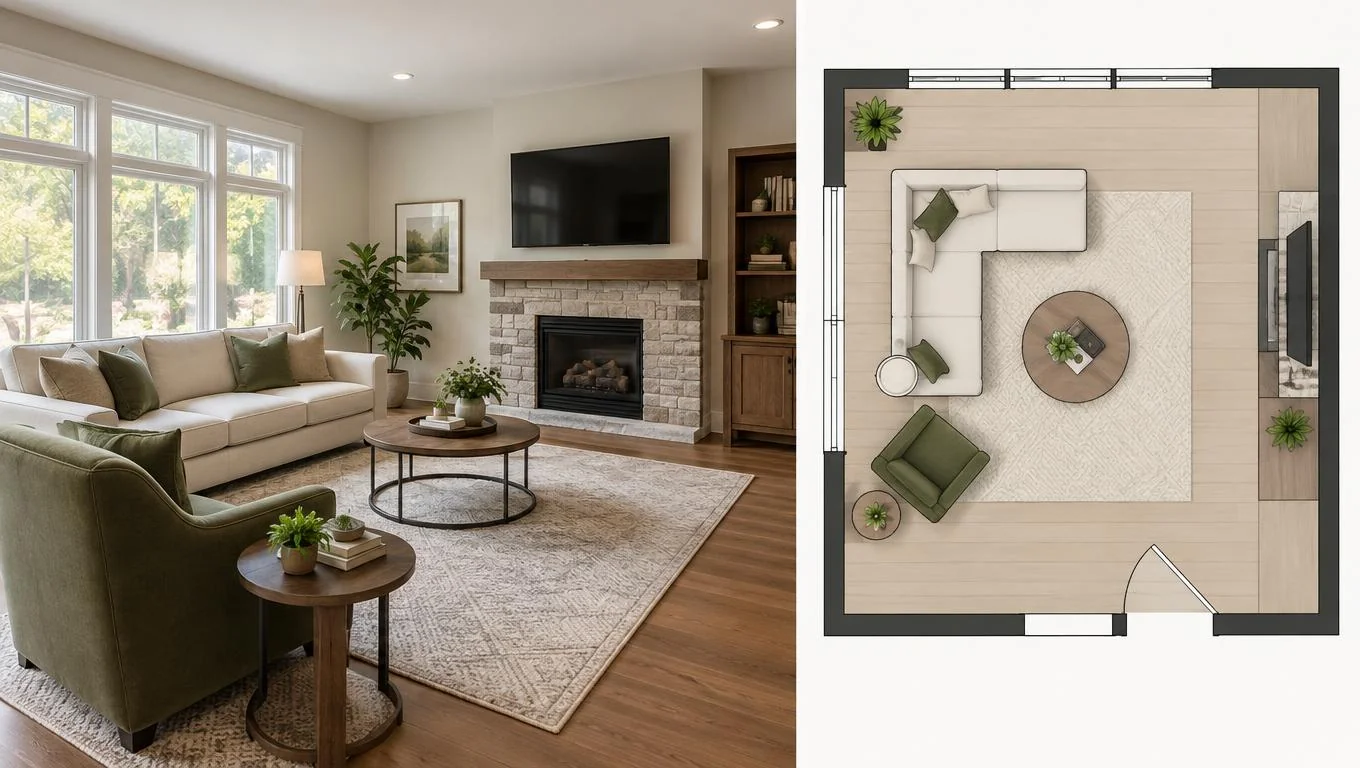
If you have been typing "room visualizer" and "room planner" into search as if they mean the same thing, here is the short answer: they solve two different problems. A room visualizer shows you a photo-realistic preview of what furniture looks like in your actual space. A room planner maps out measurements and layout, usually on a to-scale floor plan, so you know what physically fits.
So the room visualizer vs room planner question is really a question about what you are stuck on. Can't picture whether a dark sofa will make the room feel small? That is a visualizer job. Not sure if a king bed leaves enough walking space? That is a planner job. This guide gives you a decision table, an honest look at each, and clear rules for when to pick which. No tool roundup, no hype.
Quick Comparison Table
Here is the fast version. Most people only need one of these to get unstuck, and the right pick depends on whether your real question is "what will this look like?" or "will this even fit?"
| Factor | Room Visualizer | Room Planner |
|---|---|---|
| Core job | Photo-realistic preview of furniture in your room | To-scale layout and measurements |
| Input | A photo of your space | Room dimensions / floor plan |
| Shows realism | High, looks like a real photo | Low, diagrams, blocks, or icons |
| Shows fit & spacing | Approximate | Precise |
| Effort | Low (upload and go) | Medium (enter measurements) |
| Speed | Seconds | Minutes to set up |
| Best for | Deciding style, color, and vibe | Deciding dimensions and traffic flow |
Room Visualizer: In-Depth Look

A room visualizer answers the question your eyes care about most: what will this actually look like? You start with a photo of your empty or sparsely furnished room, and the tool renders furniture and decor into that same space so the result reads like a real interior photo: same windows, same floor, same light.
This matters because flat product shots lie. A sofa that looks neutral on a white studio background can feel heavy and dark once it is sitting under your north-facing window. A visualizer closes that gap. You see proportion, color harmony, and overall mood before you commit, which is exactly where most furniture regret comes from.
Modern AI-based tools make this fast. Instead of dragging 3D models around, you upload one clear daylight photo and choose a style, and a furnished preview appears in seconds. If you want the mechanics behind that, our explainer on how a room visualizer works walks through the photo-to-preview process step by step.
When you are weighing a specific purchase, this is the moment to use a room visualizer to preview furniture in your real room rather than guessing from a catalog thumbnail. It is the lowest-effort way to pressure-test a style decision.
Where a visualizer is weak: it is not a tape measure. It shows you a convincing impression of scale, but it will not promise that a 92-inch sectional leaves exactly 30 inches of walkway. For style confidence it is excellent; for millimeter-accurate fit, it is approximate. One more honest limit worth stating plainly: a photo-based AI visualizer adds movable furniture and decor to your room. It does not repaint walls, swap flooring, or remodel the space. That is a feature, not a flaw, if your goal is to plan furniture for a room you are moving into or furnishing fresh.
Room Planner: In-Depth Look
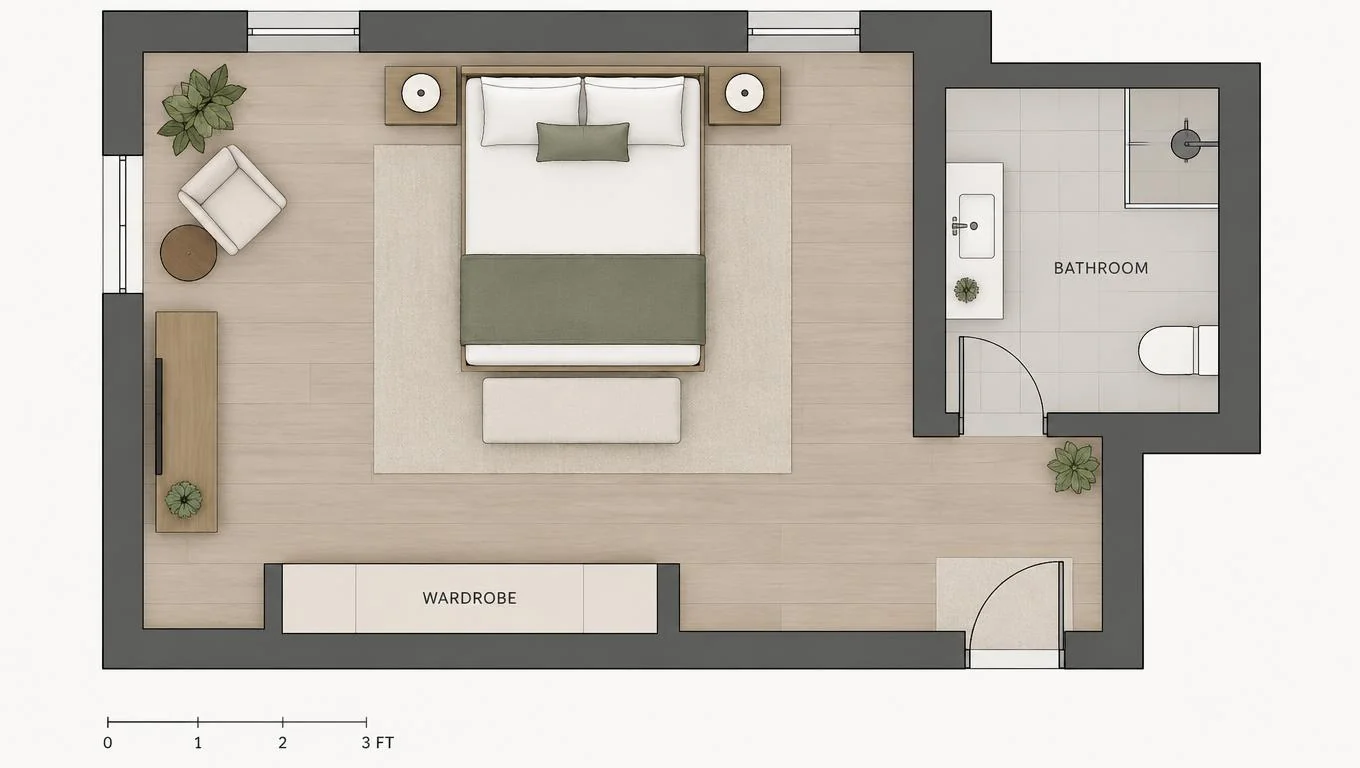
A room planner answers the question your wallet and your doorways care about: will this fit, and can I walk around it? You enter your room's dimensions, then place to-scale representations of furniture (rectangles, blocks, or simple 3D models) onto a floor plan. The output is a diagram, not a photo.
The strength here is precision. A good room planner tool lets you test clearances: the aisle beside a bed, the gap between a coffee table and sofa, the swing of a door, the walkway through a dining area. If you are furnishing a tight studio or a narrow living room, this is where you catch the "it technically fits but you can't open the closet" problems before they happen.
Planners also shine for layout experiments. You can shove the bed to three different walls, try the sofa floating versus against the window, and compare traffic paths, all without lifting anything heavy. That makes it the natural companion to a beginner room mockup workflow when you are starting from an empty space.
Where a planner is weak: it does not sell you on style. A gray block labeled "sofa" tells you it fits, but nothing about whether the fabric, color, or silhouette suits the room. The visuals are abstract on purpose. You also have to invest a few minutes measuring and entering data, more friction than uploading a single photo. For readers who already know their measurements and just want to see the vibe, that setup can feel like busywork.
A quick caution: if you dread measuring and your real worry is aesthetic, a planner can send you down a rabbit hole of exact numbers when what you actually needed was a picture.
See Your Empty Room Fully Furnished in 30 Seconds
Upload one photo of your empty room and get a realistic furnished preview in the style you choose — before you buy a single piece of furniture.
Free to try • No design skills needed • Works with any room photo
Furnish My Room →Key Differences
Strip away the marketing and the difference comes down to three things: what you put in, what you get out, and what question you are answering.
Input. A visualizer wants a photo of your real room. A planner wants numbers: length, width, and the furniture's dimensions. If you don't have a clear photo, a planner is easier to start. If you don't want to measure anything, a visualizer is easier.
Output realism vs precision. This is the core split. A visualizer gives you a realistic image but approximate measurements. A planner gives you precise measurements but an abstract image. Neither does both perfectly, and no honest tool claims to.
The question each answers. Use this rule of thumb:
- "Will this look right?" → room visualizer
- "Will this fit and leave room to walk?" → room planner
- "Both, and I'm furnishing from scratch?" → plan the layout first, then visualize the winner
There is also an effort gap. A visualizer is close to zero setup; a planner asks for a few minutes of measuring up front. For a quick gut check on style, that friction is why many people reach for a visualizer first, and only open a planner when a tight space makes exact clearances non-negotiable.
When to Choose Each Option
Match the tool to your situation rather than the other way around.
Choose a room visualizer when:
- You are deciding between styles, colors, or finishes and need to see them in your actual space.
- You are about to buy a sofa, bed, or rug and want to avoid a costly return.
- You have a photo of an empty or nearly empty room and want results fast.
- You care more about mood and proportion than exact inches.
Choose a room planner when:
- Your space is tight and clearances are make-or-break: a studio, a narrow living room, a small bedroom.
- You need to confirm a specific piece physically fits before ordering.
- You are arranging multiple pieces and want to test traffic flow.
- You already know your measurements and enjoy precise layout tinkering.
Who should avoid each: Skip the planner if your only real question is "what will this look like?" It will hand you accurate blocks and zero style confidence. Skip the visualizer as your sole tool if your room is so tight that a few inches decide everything; a photo preview reads scale well but won't guarantee a 30-inch walkway. In those edge cases, use both.
Our Recommendation
For most people furnishing a new home, a first apartment, or a fresh space, start with a room visualizer. The single biggest source of furniture regret is buying something that looks wrong once it is in the room: wrong scale, wrong color against your light, wrong overall feel. A photo-realistic preview kills that risk in seconds and takes almost no setup.
Reach for a room planner when space is genuinely tight and exact clearances matter, or when you are placing several large pieces and need to confirm the traffic flow. In those cases, the smartest move is to plan the layout first, then visualize the arrangement you settled on so you get both fit and feel.
The tradeoff is simple: realism versus precision. Pick the one that matches the question keeping you up at night, and don't over-engineer the easy decisions.
Final Thoughts
The room visualizer vs room planner choice is less about which tool is better and more about which question you need answered. A room visualizer shows you what furniture looks like in your real space; a room planner tells you whether it fits and how it flows. For style and color confidence, the visualizer wins on speed and realism. For tight spaces and exact clearances, the planner earns its few extra minutes.
If you are furnishing from scratch, the easiest first step costs nothing: take one clear daylight photo of your empty room, generate a furnished preview, and see the style decision answered before you spend a dollar. Let the CTA below handle the next step.
See Your Empty Room Fully Furnished in 30 Seconds
Upload one photo of your empty room and get a realistic furnished preview in the style you choose — before you buy a single piece of furniture.
Free to try • No design skills needed • Works with any room photo
Furnish My Room →Frequently Asked Questions
Is a room visualizer the same as a room planner?
No. A room visualizer produces a photo-realistic preview of furniture in your actual room, focused on style, color, and proportion. A room planner maps to-scale measurements and layout on a floor plan, focused on whether pieces fit and how you move around them. They answer different questions.
Can I use both together?
Yes, and for tight or complex spaces that is the best approach. Use a room planner to lock in a layout that fits and leaves walking room, then use a visualizer to see what that arrangement actually looks like in your space before you buy.
Do I need to measure my room for a visualizer?
Not to start. A room visualizer works from a photo, so you can get a style preview without entering dimensions. If exact clearances are critical because the space is small, measure anyway and confirm fit with a planner alongside the visual preview.
Which is better for a small apartment?
If your worry is whether furniture physically fits and leaves walkways, a room planner's precision matters most. If your worry is making a small space feel open and well-styled, a visualizer helps you test lighter colors and proportions. Tight studios often benefit from using both.
Does a room visualizer change my walls or floors?
A photo-based AI room visualizer adds movable furniture and decor to your existing room. It does not repaint walls, replace flooring, or remodel the structure. That makes it ideal for previewing how a space will look once furniture arrives, not for renovation planning.


