
What Is Virtual Staging? A Plain-English Guide for Homeowners
Introduction
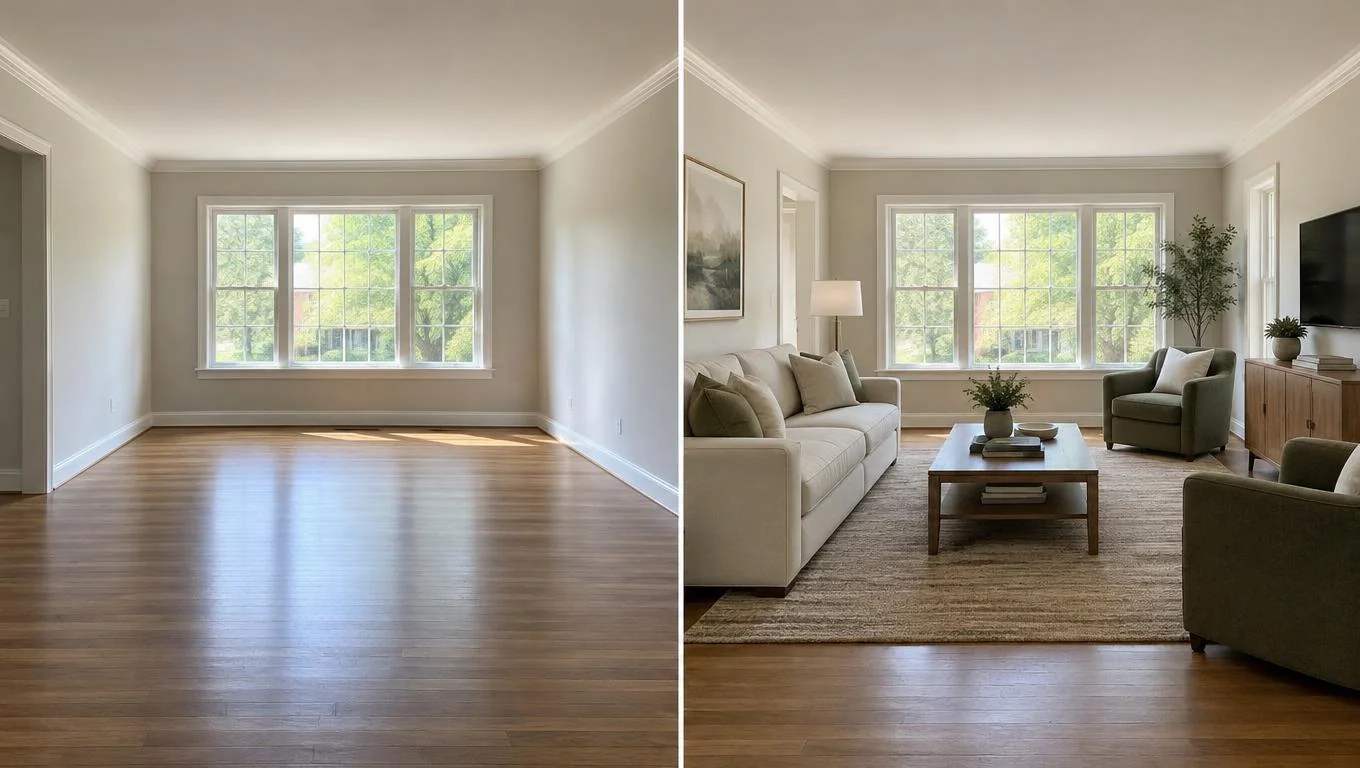
Virtual staging is the process of adding realistic, digital furniture and decor to a photo of an empty room, so you can see the space fully furnished without buying or moving a single item. You upload a photo of a bare room, and you get back a photorealistic version styled with a sofa, bed, rug, lamps, and other movable pieces. That is the whole idea: photo in, furnished photo out.
If you searched for the term because you saw it on a listing or an app and wanted the plain-English version, this guide is for you. We will cover what virtual staging means, how it actually works, what it can and cannot do, and who uses it most. No jargon, no sales pressure. Just a clear picture of the tool so you can decide whether it fits your situation.
By the end, you will know exactly what to expect from a virtual staging tool, and you will be able to try one on a photo of your own empty room in about 30 seconds.
Key Takeaways
Here are the short answers before we dig into the details:
- Definition: Virtual staging adds digital furniture and decor to a photo of an empty room to show it fully furnished.
- How it works: You upload one photo, choose a style, and the tool generates a furnished version in seconds.
- What it does: Places movable furniture and soft decor, so you can preview layout and style.
- What it does not do: It does not repaint walls, replace flooring, or remodel anything built in.
- Who uses it: Renters, new homeowners, and hosts who want to preview a space before spending money on furniture.
What Is Virtual Staging?
Virtual staging means digitally furnishing a photo of an empty room. Instead of renting real furniture and arranging it in a physical space, you use software to drop realistic furniture into the picture. The result looks like a photograph of a lived-in room, but nothing was physically moved.
The core idea is simple: start with an empty space, end with a furnished preview. A blank living room becomes a room with a sectional, a coffee table, a rug, and framed art. An empty bedroom gains a bed, nightstands, and a reading chair. You see the room's potential without committing to anything.
Traditional, physical staging has been common in real estate for decades, where sellers bring in rented furniture to help buyers imagine living there. Virtual staging does the same job through a photo, which makes it faster and far cheaper. For homeowners and renters, that shift matters. You do not need a photographer, a warehouse of furniture, or a design budget to see what your space could look like.
Modern virtual staging is powered by AI room design. You give the tool a photo, it reads the room's dimensions and light, and it generates furniture that fits the perspective naturally. Early versions relied on manual editing by graphic designers. Today, a good tool can produce a realistic furnished image on its own, which is why the term shows up so often for regular people planning a move or a purchase.
Why Virtual Staging Matters
Furniture is expensive, and returns are a hassle. Seeing a room furnished before you buy helps you avoid the two most common and costly mistakes: buying pieces that do not fit and choosing a style that clashes once it is in the room.
An empty room is hard to read. Blank walls and bare floors make spaces look smaller or larger than they really are, and it is genuinely difficult to picture a sofa's scale against a wall you have only measured with a tape. A furnished preview gives you a reference point. You can see whether a sectional overwhelms the space or whether a smaller loveseat leaves the room feeling empty.
There is a real financial angle too. Furniture returns are common and often come with restocking fees or return shipping costs, so previewing before you order can save both money and frustration. Most people find that seeing a layout first leads to more confident decisions and fewer regret purchases.
It also saves time. Rather than driving to showrooms or scrolling endlessly, you can test several looks on your actual room in minutes. That means you spend your energy on choices you love, not on guesswork.
See Your Empty Room Fully Furnished in 30 Seconds
Upload one photo of your empty room and get a realistic furnished preview in the style you choose — before you buy a single piece of furniture.
Free to try • No design skills needed • Works with any room photo
Furnish My Room →How Does Virtual Staging Work?

The process is simple. Here is how virtual staging works from start to finish, step by step.
Step 1: Take a clear photo of your empty room. Stand in a corner or doorway to capture as much of the space as possible. Shoot in daylight if you can, since natural light produces the most realistic results. A phone camera is more than enough. Hold it level and avoid heavy shadows.
Step 2: Upload the photo to a virtual staging tool. You drag the image in or select it from your device. The tool reads the room, including its shape, floor, windows, and how the light falls.
Step 3: Choose a style. Most tools let you pick a look like modern, cozy, minimalist, or Scandinavian. This tells the AI what kind of furniture and decor to generate. If you already own a few pieces, choose the style that comes closest to matching them.
Step 4: Generate the furnished preview. The tool places movable furniture into the photo, matching the perspective and lighting so it looks like a real photograph. This usually takes seconds. You get a fully furnished version of your empty room, ready to review.
Step 5: Compare and iterate. Try a different style, swap the layout, or test a smaller sofa. Because it is digital, experimenting costs nothing. You can line up an empty and furnished version side by side to judge scale and flow.
If you want a detailed, hands-on walkthrough with screenshots and settings, our step-by-step guide to staging a room for free covers the workflow in depth. And if you would rather just experiment right now, you can try a free virtual staging tool on a photo of your own empty room and see the result before you commit to any furniture.
The whole point is that you do not need design skills. The tool handles perspective, scale, and lighting so the furnished image looks believable rather than pasted on.
What Virtual Staging Can and Cannot Do
This is the part most people get wrong, so it is worth being precise. Virtual staging adds movable furniture and soft decor to an empty room. It does not renovate the room. Understanding that line saves you from expecting the wrong thing.
Here is a clear breakdown of what a photo-based virtual staging tool handles well versus what falls outside its scope:
| Virtual staging can add | Virtual staging cannot change |
|---|---|
| Sofas, chairs, beds, tables, dressers | Wall color, paint, or wallpaper |
| Rugs, curtains, cushions, throws | Flooring, tile, or carpet |
| Lamps, art, plants, and shelf decor | Cabinets, countertops, and built-in fixtures |
| Full-room layouts and styling | Walls, room structure, or square footage |
In plain terms: it furnishes the room, it does not remodel it. If your walls are a color you dislike, virtual staging will not repaint them. If your floor needs replacing, the tool will not swap it. What it will do is show you how furniture and decor look inside the room exactly as it is now.
Best practices that lead to the most realistic results:
- Use a well-lit, in-focus photo taken during the day.
- Capture the whole room, not just one wall.
- Start with a genuinely empty room, since the tool is designed to add furniture, not redesign an already-furnished space.
- Try two or three styles so you can compare before deciding.
- Keep the camera level to avoid a distorted perspective.
Because virtual staging works on movable pieces only, it is a natural fit for a specific set of moments: moving into a new home, setting up a first apartment, previewing before a furniture purchase, or preparing an empty unit. It shows the room's potential without touching anything permanent.
Common Mistakes to Avoid
Virtual staging is easy to use, but a few missteps can leave you disappointed with the result. Here are the ones worth sidestepping.
Expecting it to renovate. The most frequent letdown comes from expecting wall, floor, or cabinet changes. It furnishes, it does not remodel. Set your expectations there and you will be happy with what you get.
Using a dark or cluttered photo. A dim, blurry, or partly furnished photo gives the tool less to work with. Clear out the room, open the blinds, and shoot in daylight for the cleanest results.
Cropping too tight. If your photo only shows one wall, the furnished preview cannot represent the full layout. Capture the room from a corner so the whole floor is visible.
Treating one style as the final answer. The value of virtual staging is easy comparison. Generate a few looks. A style that seems right in your head can look very different once it is in your actual room.
Confusing it with an AR app or a 3D planner. Virtual staging is photo-based, so it shows your real room rather than a generic template. If you want to walk through a space with your phone camera, that is AR; if you want to build a floor plan from scratch, that is a 3D planner. Each has its place.
Related guides: For next steps, use How to Decorate an Empty Living Room from Scratch (Without a Designer), How Does a Room Visualizer Work? (And When to Use One), Virtual Staging Examples: 12 Before-and-After Room Transformations, and Does Virtual Staging Really Work? Honest Pros, Cons, and Limits to connect this advice with the rest of your room design plan.
Final Thoughts
Virtual staging is a simple, affordable way to see an empty room fully furnished before you spend a dollar. Photo in, furnished photo out. It adds realistic movable furniture and decor so you can judge layout, scale, and style with confidence, while leaving walls, floors, and fixtures exactly as they are. Knowing what virtual staging can and cannot do is what makes it genuinely useful rather than disappointing.
The best way to understand it is to try it on your own space. Take one clear daylight photo of your empty room, upload it, pick a style, and see the furnished result for yourself. The CTA below will take you straight to it.
See Your Empty Room Fully Furnished in 30 Seconds
Upload one photo of your empty room and get a realistic furnished preview in the style you choose — before you buy a single piece of furniture.
Free to try • No design skills needed • Works with any room photo
Furnish My Room →Frequently Asked Questions
Is virtual staging the same as physical home staging?
No. Physical staging brings real rented furniture into a room, while virtual staging adds digital furniture to a photo. Virtual staging is faster and cheaper because nothing is physically moved, but it lives in an image rather than the actual space.
Does virtual staging change the walls or floors?
No. Virtual staging only adds movable furniture and decor like sofas, rugs, lamps, and art. It does not repaint walls, replace flooring, change cabinets, or alter anything built into the room. Your space stays exactly as it is, just furnished in the preview.
Do I need design skills to use a virtual staging tool?
No skills required. You upload a photo, choose a style, and the tool handles perspective, scale, and lighting automatically. Most people get a realistic furnished preview on their first try in under a minute.
What kind of photo works best for virtual staging?
A clear, well-lit photo of an empty room taken in daylight works best. Shoot from a corner or doorway so the whole floor is visible, keep the camera level, and make sure the space is genuinely empty so the tool has room to add furniture.
Who uses virtual staging?
It is popular with renters setting up a first apartment, new homeowners furnishing after a move, and hosts preparing an empty unit. Anyone who wants to preview furniture before buying finds it helpful for making confident, cost-saving decisions.


