
Does Virtual Staging Really Work? Honest Pros, Cons, and Limits
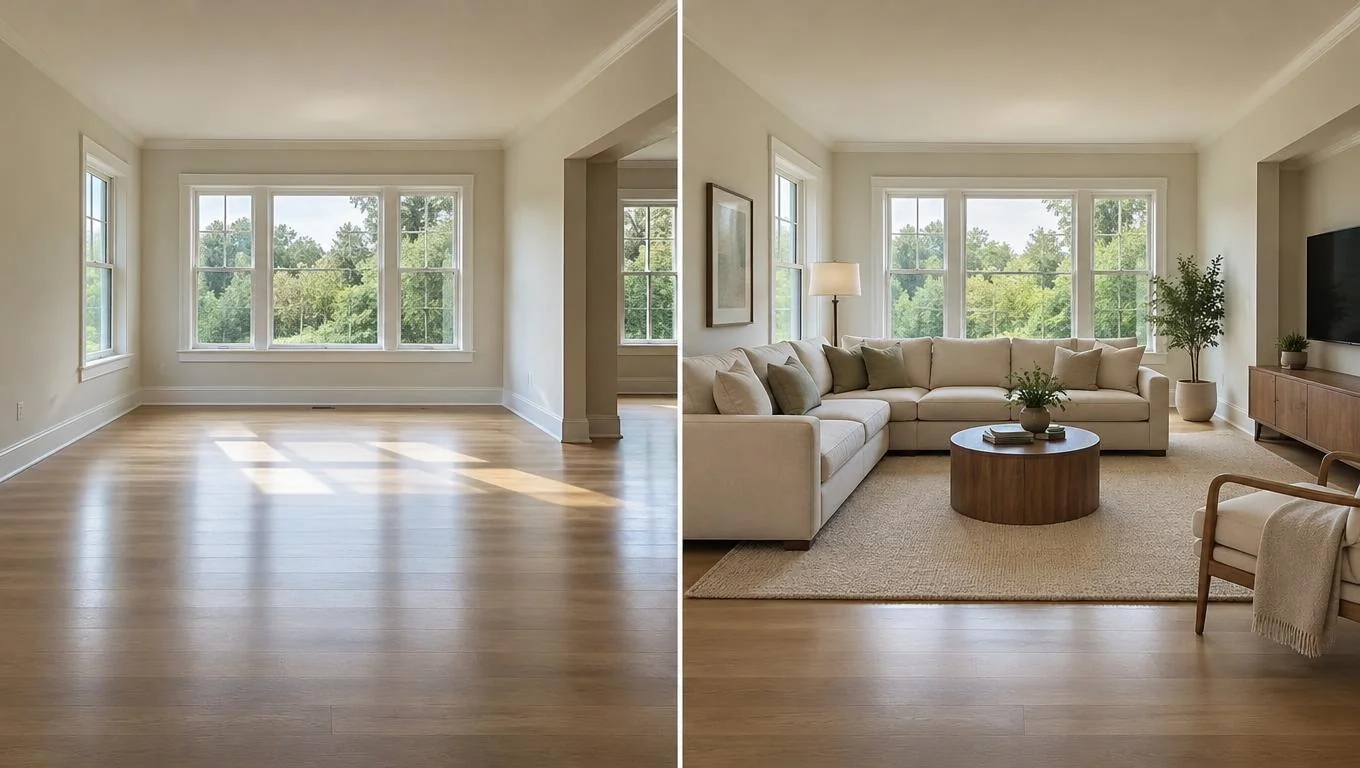
Yes, virtual staging really works, but only within a specific lane. It takes a photo of an empty room and adds realistic, movable furniture and decor so you can see the space furnished before you spend a dollar. That is exactly what it's built for, and modern AI tools do it convincingly in seconds.
Where people get burned is expecting it to do something it was never designed to do: repaint walls, swap flooring, redesign a room that already has furniture in it, or renovate the structure. It won't. So the honest answer to "does virtual staging work?" is that it works beautifully for previewing furniture in a bare room, and it falls apart the moment you ask it to remodel. This guide walks through the real pros, the real cons, and when it's worth it.
Key Takeaways
- It works for empty rooms. Virtual staging works best when you start from a clear photo of a bare or nearly bare space, which is perfect for new homes, fresh starts, and planning before furniture arrives.
- It's a preview, not a renovation. It adds furniture and decor. It does not repaint, re-floor, or restructure anything.
- Realism depends on your photo. Good daylight and a straight, uncluttered shot produce the most believable results.
- It's cheap insurance. Previewing a layout first helps you avoid costly furniture-buying mistakes.
- Skepticism is healthy. Knowing the limits upfront is what makes the results trustworthy.
What Is Virtual Staging?
Virtual staging is the process of digitally adding furniture and decor to a photograph of a real room. Instead of renting physical furniture and arranging it in person, you upload a picture and the software fills the space with a sofa, a bed, a rug, lamps, and art, whatever fits the room type and the style you pick.
Traditional virtual staging was done by hand by graphic artists, which is why it used to cost money and take days. AI tools have changed that. Today you can upload one photo and get a furnished version back in about 30 seconds, in several styles, for little or nothing. If you want a plain-English primer, our guide to what virtual staging is breaks the whole concept down for homeowners.
Here's the part that matters most for your expectations: the best results come from an empty room. The AI needs a clean canvas, bare floors and walls, to place furniture naturally. That isn't a limitation to apologize for. It's the ideal scenario. You've just moved in, you're setting up a first apartment, you're staging an unfurnished unit, or you're planning a purchase before the delivery truck shows up. Those are the exact moments virtual staging was made for.
What it is not: a remodeling tool. It will not change your wall color, replace your tile, or redesign a living room that's already packed with your old furniture. Keep that boundary in mind and the technology delivers exactly what it promises.
Why Virtual Staging Matters
An empty room is hard to read. Bare walls and open floors make a space feel smaller, colder, and harder to picture living in. That uncertainty leads to expensive guesses: buying a sectional that swallows the room, a bed that blocks the closet, or a rug two sizes too small.
Virtual staging matters because it replaces guessing with seeing. You get a realistic preview of how furniture fits, how a style feels, and whether a layout actually works for the space you have. For most people, that's the difference between confident decisions and a garage full of returns.
The financial case is real too. Furniture is one of the most-returned big-ticket categories, and returning a bulky sofa often means restocking fees and freight costs. Previewing first is cheap insurance against that. Most people find that seeing a room furnished, even roughly, makes them far more decisive about what to actually buy.
It also saves time. Instead of scrolling endless catalog photos trying to imagine them in your space, you see your space furnished. That shortcut is why virtual staging has moved from a niche real-estate trick to a tool everyday renters and homeowners use before they shop.
How to Get Started
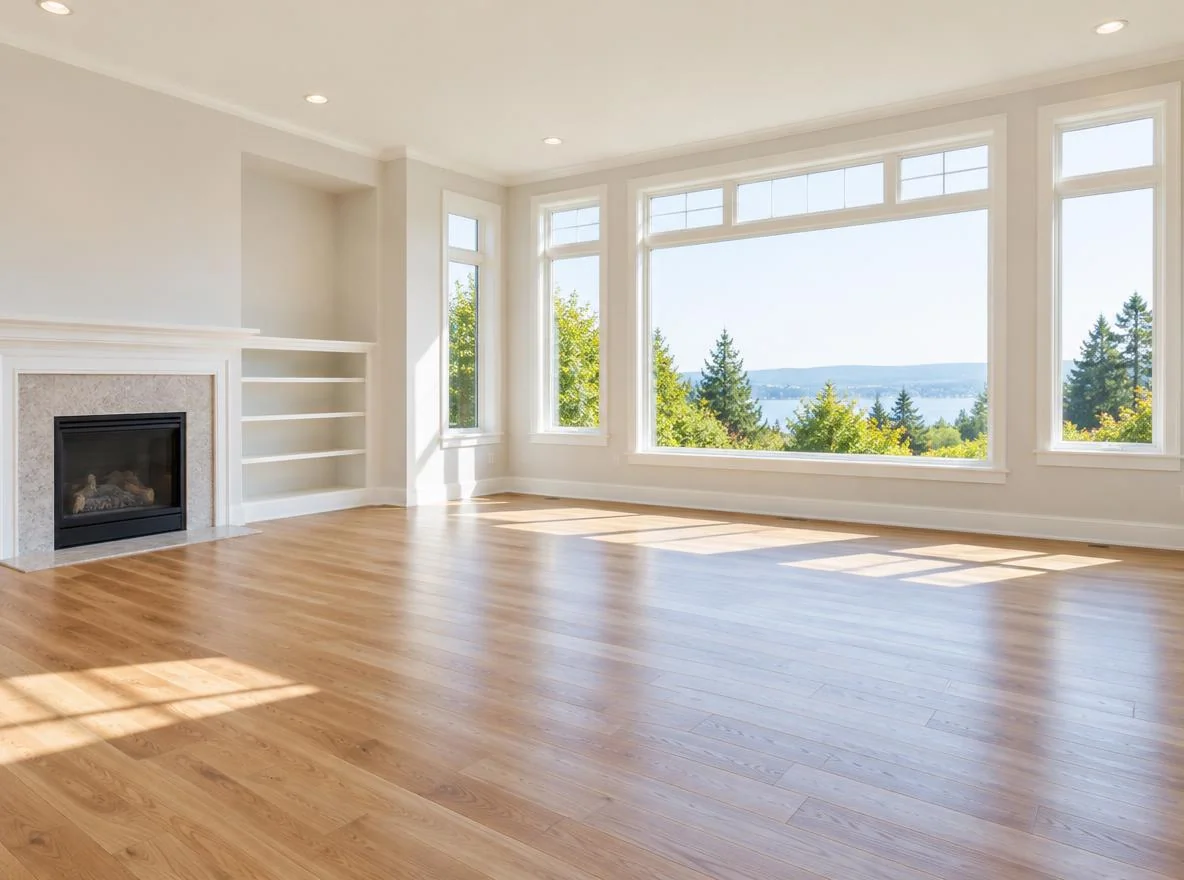
Getting a believable result is mostly about the photo you start with. The AI can only work with what you give it, so a few minutes of prep pays off. Here's the practical sequence.
1. Clear and photograph the empty room
Virtual staging works best on a bare space, so remove any leftover boxes, bins, or stray items. Open the blinds and shoot in natural daylight. Morning or midday light looks the most realistic. Stand in a corner so you capture two walls and the floor, hold the phone at chest height, and keep the camera level so lines stay straight.
2. Upload and choose a style
Upload the photo and pick a style and room type. Most tools offer options like modern, Scandinavian, mid-century, or cozy traditional. Choosing the right room type (living room, bedroom, dining) tells the AI which furniture set to place.
This is the stage where you can experiment freely. Want to compare how your space reads with a sectional versus two armchairs? Generate both. You can try a free virtual staging tool on a photo of your own empty room and see several furnished versions side by side before committing to anything.
3. Review for realism and fit
Look at scale first. Does the sofa leave walking room? Does the bed fit the wall without crowding the door? Check that shadows and perspective look natural. If something feels off, regenerate. A slightly different photo angle often fixes it.
4. Use it to make real decisions
Once you have a version you like, treat it as a shopping brief. Note the proportions that worked, the style you preferred, and the pieces that filled the space well. That becomes your plan when you buy.
| Stage | What to do | Why it matters |
|---|---|---|
| Prep | Clear the room, open blinds | Clean canvas = realistic placement |
| Shoot | Daylight, two walls, level camera | Straight lines and depth look believable |
| Generate | Pick style + room type | Correct furniture set and mood |
| Review | Check scale, clearance, shadows | Catches fit problems before buying |
See Your Empty Room Fully Furnished in 30 Seconds
Upload one photo of your empty room and get a realistic furnished preview in the style you choose — before you buy a single piece of furniture.
Free to try • No design skills needed • Works with any room photo
Furnish My Room →Best Practices

The gap between a staging result that looks fake and one that looks real usually comes down to a handful of habits. Follow these and your previews will hold up.
Start with the emptiest, cleanest shot you can get. Clutter confuses placement. A bare floor and plain walls give the AI room to work and produce the most natural furniture arrangement.
Shoot in daylight, not under a single ceiling bulb. Even, natural light makes added furniture blend into the room's real shadows. Harsh overhead light or a dim phone shot flattens everything and exaggerates the "pasted-in" look.
Keep the camera level and capture depth. A tilted phone throws off perspective, which is the number-one reason furniture looks like it's floating. Standing in a corner to show two walls gives the AI the depth cues it needs.
Match the style to the architecture. A sleek modern set in a cottage with crown molding will read as a mismatch. Pick furniture that suits the bones of the room you actually have.
Generate multiple versions and compare. Don't settle on the first result. Comparing two or three layouts is where the real value shows up, since you learn what fits and what doesn't. Browsing before-and-after staging examples is a great way to calibrate what realistic results should look like.
Use it as a decision tool, not a final blueprint. The goal is confident choices about scale and style, not a pixel-perfect rendering. Let it narrow your options, then verify measurements with a tape before you order.
Common Mistakes to Avoid
Most disappointment with virtual staging traces back to a few avoidable expectations. Knowing them upfront is what keeps the tool honest and useful.
Expecting it to remodel. This is the big one. Virtual staging adds movable furniture and decor. It does not change wall color, flooring, tile, cabinets, or countertops, and it won't knock down walls. If you want new paint or new floors, that's a renovation, not a staging preview. Judge the tool by what it's built for.
Staging a room that's already furnished. The AI needs an empty canvas. Feeding it a room crammed with your current couch and shelves produces muddy, unrealistic results. Clear the space first.
Using a dark or crooked photo. Garbage in, garbage out. A dim, tilted shot is the fastest route to a fake-looking result, and then people blame the technology instead of the input.
Treating the preview as exact measurements. It's a visual guide to scale and style, not a millimeter-accurate plan. Always confirm real dimensions before buying.
Picking a mismatched style and giving up. If the first result feels off, change the style or room type and regenerate rather than writing the whole thing off.
Final Thoughts
So, does virtual staging work? Yes, convincingly, as long as you use it for what it's designed to do: previewing furniture and decor in a photo of an empty room. That makes it perfect for new homes, first apartments, unfurnished rentals, and planning before furniture arrives. The honest limit matters just as much: it previews furnishings, it doesn't renovate. Whether virtual staging is worth it comes down to that match. If you're furnishing a bare space, it's one of the cheapest ways to avoid expensive buying mistakes.
The best way to judge it is to try it on your own room. Take one clear, daylight photo of your empty space, generate a furnished version, and see whether it helps you decide. Let the CTA below handle the next step.
See Your Empty Room Fully Furnished in 30 Seconds
Upload one photo of your empty room and get a realistic furnished preview in the style you choose — before you buy a single piece of furniture.
Free to try • No design skills needed • Works with any room photo
Furnish My Room →Frequently Asked Questions
Does virtual staging actually look realistic?
Yes, when you start with a clean, well-lit photo of an empty room. Realistic shadows, scale, and perspective all depend on your input photo. A bright daylight shot taken with a level camera produces the most believable furnished result; a dark or tilted photo is the usual cause of fake-looking output.
Can virtual staging change my wall color or flooring?
No. Virtual staging adds movable furniture and decor to your room photo. It does not repaint walls, swap flooring or tile, change cabinets, or alter the structure. If you want to change those elements, that's a renovation project, not something a staging preview is designed to do.
Do I need an empty room to use virtual staging?
An empty or nearly empty room gives the best results because the AI has a clean canvas to place furniture naturally. That makes it ideal for new homes, first apartments, and planning before furniture arrives. Rooms already full of furniture tend to produce muddy, less convincing results.
Is virtual staging worth it for a regular homeowner?
For most people furnishing a bare space, yes. Previewing a layout and style before buying helps you avoid oversized sofas, awkward beds, and costly returns. Since many tools let you try it free, the main cost is a few minutes of photo prep against potentially hundreds in avoided mistakes.
How long does virtual staging take?
With AI tools, a furnished preview typically takes around 30 seconds per generation. You can create several versions in different styles quickly, which is useful for comparing layouts. Traditional hand-done virtual staging took hours or days, but modern tools make instant previews the norm.


