
Furniture Placement Apps Compared: AR, 3D Planners, and Photo-Based AI Tools
Introduction
The best furniture placement app depends on what you actually need to decide. If you want to see whether a sofa physically fits against your wall, an AR app wins. If you want to plan exact dimensions and traffic paths for a whole room, a 3D planner is stronger. If you want a realistic photo of your empty room fully furnished before you spend a dollar, a photo-based AI tool is the fastest path.
This guide compares three categories, not individual brands: IKEA-style AR apps, Planner 5D-style 3D planners, and photo-based AI like InteriorStage. We'll break down what each category is good at, what it skips, and roughly what it costs, so you can match the right tool to your room and your budget before you commit to your first big pieces.
Quick Comparison Table
Here is the fast version. Each category earns its place for different reasons, and most people end up using more than one during a move. Use this table to spot which approach fits your immediate question: fit, layout, or a realistic preview.
| Category | Cost | Effort | Realism | Speed | Best for |
|---|---|---|---|---|---|
| AR apps (IKEA-style) | Free, limited catalog | Low | Medium (one item at a time) | Instant | Checking if one specific piece fits |
| 3D planners (Planner 5D-style) | Free tier + paid upgrades | High | Medium-high (model-based) | Slow (manual build) | Exact measurements and whole-room layout |
| Photo-based AI (InteriorStage-style) | Free tier available | Very low | High (photorealistic) | ~30 seconds | Seeing your empty room furnished realistically |
AR Apps: In-Depth Look
Augmented reality apps let you point your phone camera at the room and drop a virtual piece of furniture into the live view. Retailer apps like IKEA Place pioneered this for consumers, and the appeal is obvious. You see a true-to-scale couch sitting on your actual floor, right now.
AR answers one narrow question extremely well: does this exact item fit here? Because the furniture is rendered at real dimensions over your real space, you get a reliable sense of scale. For a renter deciding whether a particular armchair blocks a doorway, that is genuinely useful.
What AR is good at:
- Instant, free, true-to-scale fit checks
- Testing one product you are already considering
- No account or upload required to start
What AR skips:
- You are usually locked to one retailer's catalog, so you cannot mix brands freely
- Placing a full room of items one at a time is tedious, and the result rarely looks cohesive
- The live overlay can drift or clip through walls, which hurts realism
Who should avoid AR: If you have an empty room and no idea where to start, AR gives you a blank canvas and one product at a time, not a plan. It answers "does this fit" far better than "what should go here."
Cost: Most retailer AR apps are free, because they exist to sell you their own products. The hidden cost is catalog lock-in rather than a subscription fee.
3D Planners: In-Depth Look

3D room planners take a different approach. You build a digital model of your room: enter the wall lengths, place doors and windows, then drag furniture models into a floor plan you can view in 2D or 3D. Tools in the Planner 5D family are the familiar example.
This is the category for precision. If you care about exact clearances, electrical outlet positions, or whether a sectional leaves 30 inches of walking space, a planner lets you measure everything. It is the closest consumer tool to how a designer thinks about space, and the output doubles as a shareable layout.
What 3D planners are good at:
- Accurate dimensions, clearances, and traffic flow
- Planning a whole room (or home) from scratch
- Reusable layouts you can tweak and share
What 3D planners skip:
- They demand real effort: measuring, building walls, and placing each item by hand
- Furniture appears as generic 3D models, not the specific pieces you plan to buy
- The look is model-rendered, not photorealistic, so it feels more like a diagram than a preview
Who should avoid 3D planners: If you want a quick, realistic answer and dread fiddly setup, the learning curve will frustrate you. These tools reward patience. For a deeper split between these two mindsets, our room visualizer vs room planner comparison breaks down when measurement-first beats preview-first.
Cost: Most offer a free tier with limited catalog or export options, then charge a subscription or one-time upgrade, often a few dollars a month, to unlock high-resolution renders and the full furniture library.
See Your Empty Room Fully Furnished in 30 Seconds
Upload one photo of your empty room and get a realistic furnished preview in the style you choose — before you buy a single piece of furniture.
Free to try • No design skills needed • Works with any room photo
Furnish My Room →Key Differences
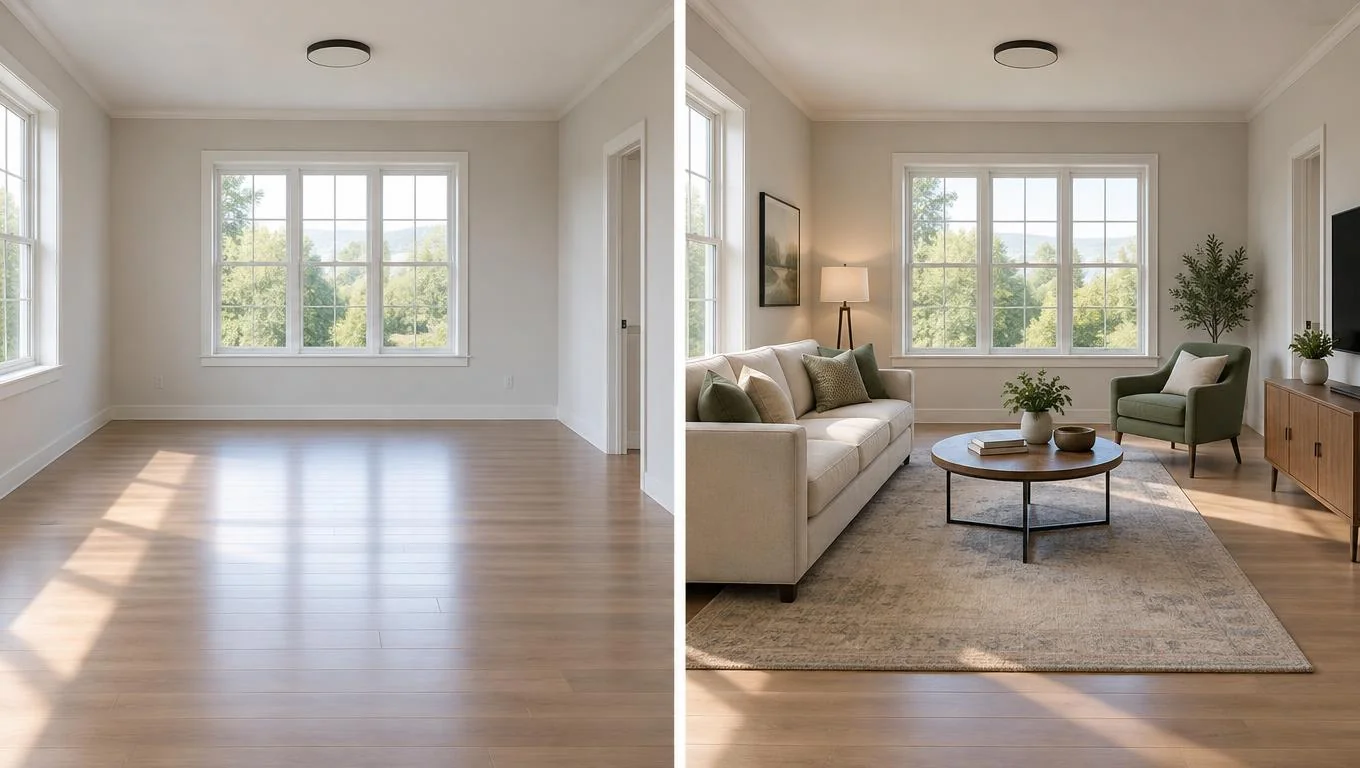
The three categories answer three different questions, and that is the real distinction, not price. AR answers "does this one item fit?" A 3D planner answers "what are the exact measurements and flow?" Photo-based AI answers "what would my whole room look like, realistically, furnished?"
Photo-based AI is the newest category. Instead of building a model or overlaying a single product, you upload one photo of your empty room and the tool generates a furnished version of that same space in seconds. You can try a room visualizer on your own photo to see how a full set of furniture reads in your actual light and proportions, rather than imagining it from a diagram.
The tradeoff: AI previews are designed to show you a realistic, cohesive look and a style direction, not to hand you a shopping list with exact SKUs. They are excellent for confidence and inspiration, and for picturing scale and style together. They are not a substitute for a measuring tape when you need a hard clearance number. Many people pair an AI preview for the vision with a quick manual measurement for the final fit. For how the technology handles scale, see how AI furniture placement works.
When to Choose Each Option
Match the tool to the decision in front of you. Here are the clearest cases.
Choose an AR app when: You have already picked a specific product and just need to confirm it fits a specific spot. You want zero setup and an instant answer. You are shopping within one retailer you already like.
Choose a 3D planner when: You are furnishing a whole room or home and need exact measurements, clearances, and a reusable layout. You enjoy the planning process, or the stakes (a built-in nook, an awkward alcove) demand precision. You are coordinating with a partner or landlord and want a shareable plan.
Choose photo-based AI when: Your room is empty and you want to see it furnished realistically before committing to a style or spending on big pieces. You want speed and a photorealistic result over manual control. You are a renter or new homeowner who needs direction, not a CAD session. It works well for a new home, a fresh start, or planning before the furniture arrives. If you are weighing full digital options, our furniture visualizer guide covers the broader landscape.
Our Recommendation
There is no single winner. The right furniture placement app depends on your next decision. If you are starting from an empty room and want confidence fast, begin with a photo-based AI tool to lock in a style and overall layout you love. It is the lowest-effort way to see a realistic result, and tools like InteriorStage offer a free tier so you can test it on your own photo at no cost.
Then, if a specific piece has tight tolerances, confirm the exact fit with an AR app or a quick tape measurement. Reach for a full 3D planner only when precision across a whole space genuinely justifies the extra hours. The tradeoff is simple: AI buys you speed and realism, planners buy you precision, and AR buys you a single reliable fit check.
Final Thoughts
Choosing a furniture placement app gets easier once you stop asking which is "best" and start asking what you need to decide today. AR confirms a single fit, 3D planners nail measurements, and photo-based AI shows your empty room furnished in a realistic, cohesive way in about 30 seconds. Most people use a mix across a move, and that is fine.
If your room is empty and you want a confident starting point before buying, take one clear daylight photo of the space, try a furnished preview, and let the result guide your first big purchases. The CTA below will get you there.
See Your Empty Room Fully Furnished in 30 Seconds
Upload one photo of your empty room and get a realistic furnished preview in the style you choose — before you buy a single piece of furniture.
Free to try • No design skills needed • Works with any room photo
Furnish My Room →Frequently Asked Questions
What is the easiest furniture placement app for beginners?
Photo-based AI tools are usually the easiest, because you only upload one photo of your empty room and the furnished result appears automatically. There are no measurements to enter or 3D models to build, which makes them the lowest-effort option for renters and first-time homeowners.
Can a furniture visualizer app show my actual room?
Yes. AR apps overlay furniture onto your live camera view, and photo-based AI tools furnish an actual photo of your empty room. 3D planners instead ask you to rebuild the room as a model, so they show a digital version rather than your real space.
Are furniture placement apps free?
Many are. Retailer AR apps are typically free because they sell their own products, 3D planners usually offer a free tier with paid upgrades, and some photo-based AI tools like InteriorStage include a free tier so you can try a furnished preview before paying.
Which app is most realistic?
Photo-based AI tools tend to produce the most photorealistic results, since they furnish an actual photo in your real lighting and proportions. AR renders are realistic for a single item, while 3D planners look more like clean diagrams than photographs.
Do I still need to measure if I use an app?
For tight spaces, yes. AI previews and 3D planners help with style, scale, and layout, but when a piece has only an inch of clearance, confirm the fit with a tape measure or an AR app before you buy.